

To maximize the effectiveness of your author website, it’s necessary to study the data behind how people find your website, navigate it, and use it. This is typically done via Google Analytics, a free tool available to anyone with a Google account. On the day you install it, you’ll immediately start collecting data on your website traffic and visitors; while you won’t be able to see into the site’s past, you’ll start collecting and storing analytics data indefinitely.
Note: WordPress.com users cannot implement Google Analytics, and may find it difficult to get the level of data they need via WordPress’s own analytics.
1. Analyze your “calls to action” on your static pages or post pages—or most popular pages.
It’s easy to get caught up in the appearance of your homepage, the front door to your website. In Google Analytics, take a look at your Site Content Overview: your homepage may represent only 25-30% of new visits. The long tail of visits may be spread over dozens or hundreds of pages, especially if you have a blog.
For instance, on this website (which is very blog-centric), the homepage represents only 5% of my total pageviews. Most people visit a blog post and only a blog post. That means the page design template of my blog post page is critical.
So make a list of the most popular pages on your website (by using Google Analytic’s site content overview), and imagine you’re a new visitor to those pages. Then ask the following questions.
- If the goal of your website is to introduce people to your books, is it easy to see what your latest book is from your most popular pages?
- If you want people to subscribe to your blog, is it easy to immediately find the subscribe buttons or links from anywhere on your site (especially on the top half)?
- If you want people to sign up for your e-mail newsletter, is that prominent on your most popular pages?
- If you want people to find you on social media, are those links immediately available?
Whatever No. 1 goal (or call to action) you have for new visitors, make sure it’s clear regardless of what page they first land on; don’t expect people to visit more than 1 or 2 pages of your website.
Bonus tip: Study the well-worn paths on your site. When people visit your homepage, what’s the No. 1 page they are most likely to visit next? Go to Visitors Flow in Google Analytics. This exercise should tell you a lot about what your readers are interested in and how they perceive your website.
2. Start tracking the most popular outbound links.
It’s exceptionally instructive to understand how and when people leave your site. Google Analytics will give you data on exit pages for visitors (go to Site Content > Exit Pages), but it won’t automatically tell you if and when people actually click on a link to exit (e.g., a link to Amazon to buy your book).
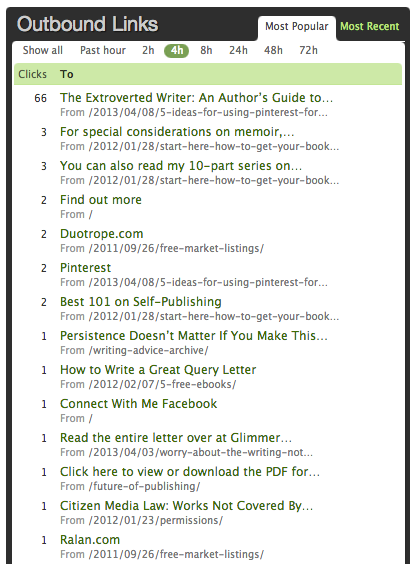
To do that, you have to help make it happen in 1 of 2 ways.
- Add a WordPress plug-in. (This post mentions a variety; scroll to the last third of the post.)
- Purchase and install Mint, which can track popular outbound links (as well as provide many other wonderful metrics and site analytics).
When I discovered that my No. 1 most popular outbound link was to an article I wrote on nonfiction book proposals at another site, I immediately wrote a new post on the topic and replaced the link, to retain visitors longer at my site.
Knowing what people click on gives you in-depth insight into what interests your readers and at what points they’re inclined to make a purchase (e.g., clicking on a discount code link to make a purchase at a retailer).
3. Install an SEO plug-in (if using a WordPress-based site), such as Yoast.
If you’ve heard about the importance of SEO, but don’t know anything about it, that’s OK, especially if you’re on a WordPress-based site. First, WordPress is very SEO friendly right out of the box, so it doesn’t take much work on your part to do good by the search engines.
But also WordPress users have access to plug-ins that help you do your absolute best on SEO. I recommend installing this one from Yoast. (It’s the one that I use.) It will not only help you understand SEO principles as you put together pages and blog posts, but it will give you additional functionality and fine-tuned control, such as being able to craft specific excerpts that are used in social-media shares and search engine display. (See screenshot below.)

I’d love to hear about any secrets you’ve learned that have meaningfully improved your author website. Please share in the comments!

Jane Friedman has spent her entire career working in the publishing industry, with a focus on business reporting and author education. Established in 2015, her newsletter The Bottom Line provides nuanced market intelligence to thousands of authors and industry professionals; in 2023, she was named Publishing Commentator of the Year by Digital Book World.
Jane’s expertise regularly features in major media outlets such as The New York Times, The Atlantic, NPR, The Today Show, Wired, The Guardian, Fox News, and BBC. Her book, The Business of Being a Writer, Second Edition (The University of Chicago Press), is used as a classroom text by many writing and publishing degree programs. She reaches thousands through speaking engagements and workshops at diverse venues worldwide, including NYU’s Advanced Publishing Institute, Frankfurt Book Fair, and numerous MFA programs.




Thank you for the tips! I just install Google Analytics last week on my blogger site, but am SLOWLY making the switch to a self-hosted WP site and really needed the tips for that.
http://forthisisthetime.blogspot.com
If you start adding all these plugins, you’re likely to slow the site down, which as far as Google is concerned, is just as important as SEO. (Not to mention your average visitor who will click away in about 2 seconds if the site loads slow.) Would suggest Cloudflare for added speed and security.
Indeed, it’s good to be picky about plug-ins.
For those reading who are worried about how fast their site loads, Google Analytics will tell you. You should also be accessing/referencing the free Google Webmaster tools, which will measure the “health” of your site.
A lot of people us WordPress – frankly it is too slow for my tastes. I have found Jigsy.com and use that for my website. It loads incredibly fast and is super easy to use, plus it has all the plugins I need. It also has methods in place to play around with the your meta data and seo stuff – critical to any website.
There are many reasons I recommend WordPress (it powers about 20% of the websites in existence!), but the most important aspects: it’s open source, not proprietary, highly customizable, and has the biggest development community surrounding it.
That’s not to say there aren’t other good solutions (I hear good things about Squarespace, for instance), but always be careful when building a site on a closed system; evaluate how easy it is to escape or export what’s there to another platform, should you decide to relocate.
Thanks for the tips, Jane!
Thanks for the Mint heads-up. I’ve signed up for Clicky, which has a plug-in for WordPress, and it tracks movement within a page. I will compare both. I have already signed up for a free webinar (w/out a recording) for mkting/promo but would have loved to sign up for your class. Shared this and thanks again for all of your help.
Yoast would be great, but apparently it’s only for self-hosted WordPressers. Too bad…
Yes, that’s the case for all WordPress plug-ins.
Thanks for the tips, Jane. SEO is the stuff that tends to slip through a writer’s fingers so it’s good to have the reminder. I use Google Analytics mainly to track how many visitors I’m receiving but I’ve never actually changed anything on my site based on the information I find there. I’ll take a closer look at exit pages now.
I just downloaded the SCRIBE plugin by Copyblogger – I have a lot to learn about it but it seems great for SEO.
I’ve heard great things about Scribe. Would highly recommend it especially for anyone who sells products directly off their site.
Thanks, Jane, for this great info. I’m slowly incorporating tips to improve my website and find your columns and webinars consistenly clear and helpful.
Thanks, Ginger. 🙂
What a fantastic list of tips – I’ve been neglecting my website while working on my next novel and now that I’ve finished realized how much work to do. You’ve made me a to-do list! Thank you.
[…] 3 Ways to Improve Your Author Website Today (hahaha) […]