
To some, I may appear productive. But like many, I’m a horrible procrastinator.
I try to think about my weakness in positive terms, e.g., “I work better under pressure.” That is true—I believe there’s nothing like a deadline to force you to be creative (one reason why I love blogging!). However, for some projects, I know that if I had budgeted my time better, I could’ve produced superior work, rather than passable or “good” work.
Recently, I’ve devised a system that has all but ended my horrible procrastination. I’d like to share it because I know I’m not unique, and most procrastinators enjoy discovering new “cures” to experiment with.
Warning: This solution does require the use of lists, which I know some people hate. (I’m looking at you, Christina!)
Step 1: Start with a master list.
You probably have a master to-do list. If you don’t, create one. Here’s a form I created that limits your to-dos to one week. If you have to-dos that stretch out further than a week, it can become overwhelming and meaningless. In the case of to-do lists, it’s best to stay in the moment as much as possible, to guide your most immediate work.
That said, if you need a reminder about a future project or deadline, put that on a different list or create a reminder/alarm. On my own worksheet, I have something called the “parking lot” that is exactly for those things too far out for me to attend to. Writing them down helps free my mental energy, so I can focus on other things.
Don’t put anything on your list that sounds like this:
- Finish my novel
- Work on XYZ project
- Build a website
You’ve just listed massive projects that need smaller action steps. For big projects, create a separate project list that breaks everything down into small action steps. This is really important! If you don’t have a specific next task you can easily tackle, you will procrastinate because you feel overwhelmed. It will induce paralysis. Repeat after me: Break down each project into its smallest possible components.
Step 2: Using Post-It notes, break up the week’s tasks by day.
Two critical points here:
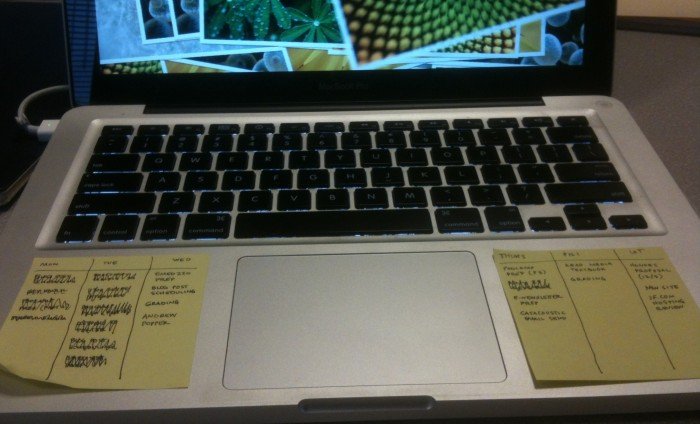
- Post-It notes are small enough to prevent you from adding too many tasks to your day, but big enough to give you an overview of 2-3 days at a time. I list the days across the top, then draw a vertical line between them. (See below.)
- Breaking up the tasks by day prevents you from saying, “Oh, I’ll get to that tomorrow.” This is important! I used to work off a master to-do list that was never-ending. Often I felt paralyzed by the amount of work I could select from; I didn’t know what to tackle first, so I delayed and did nothing. I waited for the nearest deadline to compel me to action. But when you have the whole week outlined, and you’ve strategically master-minded everything on Sunday or Monday, with all the tasks segmented by day, you feel you have things under control. You budget your time better. You get into a rhythm.
- Hint: I used to create one-day lists, not one-week lists. Once I switched to the one-week view, I became FAR more productive. Why? With one-day views, it was VERY easy for me to say, “Oh, that’ll get done tomorrow.” When I have a set of NEW tasks already outlined for the next day, I’m far less likely to make excuses. I need the week’s big-picture to keep me motivated and focused.
- For tasks that are more time-consuming, break them up into Parts 1, 2, 3 (etc), and schedule them over the course of the week. This gives you permission to jump around your to-do list, keep things interesting, and make the difficult tasks more manageable and approachable.
It’s best to have your Post-Its in the center of wherever your work. I put mine right on my laptop.
When and how could this system fall apart?
- If you have tons of stuff happening on a particular day, you may never get to your to-do list. Give yourself light task days whenever you have tons of meetings, errands, etc.
- When I worked in publishing, my to-do list was often dictated, to the minute, by incoming e-mails and social media blips. It didn’t allow me to focus on higher level tasks. This can be a tough problem to solve. Eventually I had to make a tough decision that I sometimes still enforce: No checking of e-mail until after 4 p.m. (or some other specified hour), or until certain tasks are complete. Your life will not be your own if you’re constantly getting whipped around by your inbox.
- If you’re not strategic about which day you schedule tasks, you could still end up procrastinating. For more time-consuming tasks, I break them up into parts (as suggested above), and start the process early in the week. That way, if things take longer than anticipated, I can adjust the schedule before it’s too late.
- Your to-do list is only as good as your ability to keep track of important deadlines and to prioritize. For me, the issue has never been one of awareness or prioritization. It’s been focus, direction, and motivation (especially to tackle more daunting projects, or those I’m avoiding).
What secrets do you have for overcoming procrastination? Share in the comments!

Jane Friedman has spent her entire career working in the publishing industry, with a focus on business reporting and author education. Established in 2015, her newsletter The Bottom Line provides nuanced market intelligence to thousands of authors and industry professionals; in 2023, she was named Publishing Commentator of the Year by Digital Book World.
Jane’s expertise regularly features in major media outlets such as The New York Times, The Atlantic, NPR, The Today Show, Wired, The Guardian, Fox News, and BBC. Her book, The Business of Being a Writer, Second Edition (The University of Chicago Press), is used as a classroom text by many writing and publishing degree programs. She reaches thousands through speaking engagements and workshops at diverse venues worldwide, including NYU’s Advanced Publishing Institute, Frankfurt Book Fair, and numerous MFA programs.




Hi Jane,
I was struggling with my current task list, as it has become obvious that I am not getting anything done in a timely manner. 😀 I think I suffer from the illness of “put everything on the list at once.” Thank you for this worksheet and tips. I can’t wait to try it out.
Yes, relying on a gargantuan list seems to have been my biggest mistake in the past! 🙂
Thanks Jane,
This was very helpful. I am an inverterate list maker. But sometimes I get overwhelmed by those lists and end up like a whirling dervish — lots of energy expended little accomplished.
Agreed. More lists doesn’t mean more stability!
I love lists! I keep a small notebook with me where ever I go. I have a white board in my apartment with many colored dry erase markers. I also have sticky notes on my laptop.
With all of this, I still procrastinate. =/ I am going to try and take your advice and only make week long plans.
Thanks for a great post, Jane.
Thanks, Ashley! 🙂
When I worked full-time at the electric company, I was very organized with my time and paperwork. Now that I’m a full-time writer, my organizations skills have slowly gained rust. Thank you for rehydrating the things that used to keep my life running like a well-oiled machine. I definitely need to navigate back to time-management. It would make my life so much easier. Thanks for sharing your ideas 🙂
Thanks, hope it works for you (or at least helps you find your own method)!
I like this system, particularly the bit about what might affect my ability to get things done. (I’ll resist the temptation to say ‘life’).
I’ve taken the liberty of downloading your sheet to see if it would work with me. It may be the most timely of things as we are moving from England to France. It could be a life-safer.
Martin Lake
Yes! Sometimes recognizing/understanding the pitfalls or drivers of procrastination are the key to overcoming it.
You are speaking my language here, Jane. Too much to do causes me to freeze rather than try to sort it all out. Thanks for sharing the worksheet and post-it ideas. I’ll give it a shot!
Excellent! Hope some aspect of it works out for you.
I’m going to try this with the post its on the laptop. Thanks!
Having those lists right in front of me has been important. Anything hidden away means I’ll never look … !
This is helpful, especially 2 points:
1. The single biggest distinction in effective planning is the difference between projects and actions. “Build a website” is a project that calls for many small, physical, visible actions (“to-do’s”). Keeping a separate list of projects gives you the big picture of your life.
2. View your to-do’s by the week. I just keep a list of all to-do items and boldface the items to complete in the upcoming week—different than your system, but based on the same idea.
P.S. You are so prolific, it’s still hard for me to believe that you procrastinate.
Yes, point #1 was a huge wake-up call for me when I first learned it about 2 years ago. So important …
P.S. I wonder if it’s just that I have more time on my hands than most … (no kids, no family obligations, etc) … !
I use a series of lists for another reason: they keep me from overestimating what I can do in a day. I may make a list and then say, “Hmm, that looks like too much. What can I move to another day?” I get less overwhelmed this way. I also will put time slots next to my daily tasks so that I make sure I don’t waste time or get carried away on one project at the expense of another. At the end of the day I usually feel tired, but satisfied.
Absolutely! It took me years to stop feeling bad about leftover to-dos … it was mostly a matter of expecting to accomplish too much in the time I had.
Jane,
You really gave me a savvy work tool here! I am going to start laying out my first week of tasks today, as this is my light day for work around the home. NOW maybe I will complete my National Novel Writing Month challenge this year!
Thanks for sharing this today. I really was struggling and looking for a solid way to organize myself!
DG Smeall
I’ve always thought NaNoWriMo is a great experiment for anyone to see how and if you can get work done … Usually it’s by consistently completing a series of small, achievable tasks.