
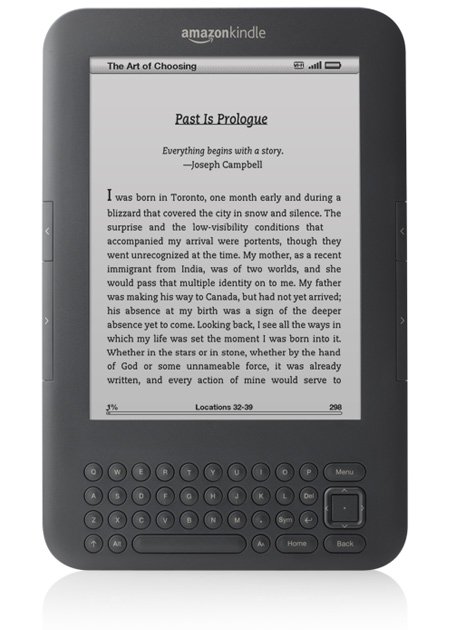
The e-book publishing landscape is changing fast—with new services, new terms, and new formats.
Despite the pace of change, here are 5 things that have remained fairly constant this year—and that you must be aware of—before you undertake any kind of self-publishing process for e-reading devices. I promise to update this list should any of these facts change. (But don’t hesitate to leave a question or comment on this post at any time.)
- E-book publishing and distribution services (e.g., Amazon’s Kindle Direct Publishing, Barnes & Noble Nook, Smashwords, etc) are nonexclusive and do not take any rights to your work. That means you can use any or all of the services at the same time, and you can take down your work at any time. (You can also upload revisions/updates and change the price at any time you like.)
- There are single-device publishing/distribution services and multiple-channel distribution services, which can be used in tandem. Smashwords and BookBaby are examples of services that will distribute your e-book to multiple e-reading devices. Amazon’s KDP (Kindle) is an example of a single-device publishing service.
- Successful e-books generally require excellent cover design (appropriate for digital viewing and reproduction), appropriate pricing, and strong social currency (testimonials, reviews, blurbs). Appropriate pricing is constantly under debate, but for novels typically runs from 99 cents to $2.99.
- Amazon royalties favor pricing between $2.99 and $9.99. Authors who publish direct with Amazon Kindle will receive a 70% royalty if they price between $2.99 and $9.99. Pricing above or below that range means a 35% royalty. You are not allowed to undercut Amazon’s price on other sites (and that includes your own site).
- Calibre is free e-book conversion software used widely by people in the industry to output e-book files from many types of sources. However, this software might prove intimidating to an inexperienced user. To avoid handling the technical aspects of formatting and conversion for your e-book (especially if you have a range of styles or illustrations used in your book), use a service such as BookBaby, which charges a flat fee to get you going.
Jane Friedman has spent nearly 25 years working in the book publishing industry, with a focus on author education and trend reporting. She is the editor of The Hot Sheet, the essential publishing industry newsletter for authors, and was named Publishing Commentator of the Year by Digital Book World in 2023. Her latest book is The Business of Being a Writer (University of Chicago Press), which received a starred review from Library Journal. In addition to serving on grant panels for the National Endowment for the Arts and the Creative Work Fund, she works with organizations such as The Authors Guild to bring transparency to the business of publishing.
[…] 5 Things Beginners Need to Know About E-Book Publishing | Jane Friedman E-book publishing and distribution services (e.g., Amazon's Kindle Direct Publishing, Barnes & Noble Nook, Smashwords, etc) are nonexclusive and do not take any rights to your work. Source: janefriedman.com […]
CreateSpace (Amazon’s self-publishing arm) charges $69 to format your paperback book published with them to a Kindle format. It was so worth it after stumbling around myself trying to do it. They did an amazing job and now my book looks professionally done.
Wonderful tip! Thank you.
Does it cost anything to print a board book from an already existing, Kindle format?
You have to set up your print books separately from the e-book edition.
[…] 5 Things Beginners Need to Know About E-Book Publishing | Jane Friedman E-book publishing and distribution services (e.g., Amazon's Kindle Direct Publishing, Barnes & Noble Nook, Smashwords, etc) are nonexclusive and do not take any rights to your work. Source: janefriedman.com […]
Thank you for these informative insights. They are most useful.
🙂
Jane i need to know what permission i need to use a famous persons quotes like:
“Don’t cry because it’s over, smile because it happened.”
― Dr. Seuss
For such a short quote, you do not need permission. Simply credit the person who said it.
Great stuff. The only thing I would ad to #5 is for people to give the word processing software Scrivener by Literature and Latte a try. I’ve been using it for almost two years now, and have no idea why everyone isn’t. While originally for Mac, they do have a Beta for PC. The back end of the software can compile my manuscript into any format (.mobi, pdf, epub, doc, html, etc.) The software is extremely affordable and very powerful.
Smashwords still requires that I convert to .doc and then do a bit more tweaking from there. This means that whenever readers point out a “where” that should be a “were” I have to fix it in Scrivener and Word in order to re-upload across the board.
It took me several hours to get the hang of about 60% of the compiling capabilities, but now I can format for anything in minutes.
Great Article. Your work is always inspiring. Keep up the good work
Thanks, Don!
Fabulous suggestion! Thanks for sharing.
I’ve been interested in #3, but I’m not sure everybody I talk to has the same definition of “excellent”. I think the traditional publishing world has some old saw they rely on (“red and yellow”, etc.), but other than that, I’m not sure what cover qualities are objectively great. I’ve seen some very, very bad covers (in my opinion) selling like hotcakes, and some really good ones that can’t buy a reader.
Any suggestions for resources that could help me learn a bit more about cover design?
You can take a look at this post for a start:
http://www.writersdigest.com/editor-blogs/there-are-no-rules/general/10-tips-for-effective-book-covers
The best rule of thumb is: Look like the bestsellers in your genre. Aside from that, make sure the title is clear, large, and legible—and that the cover looks good at a very small size, and in grayscale.
Other best resource: http://thebookdesigner.com
Thanks!
[…] 5 Things Beginners Should Know About E-Book Publishing. I review the basics. […]